How to Play GTA 6 Safely (PS5, Xbox, PC, Mobile) & 1-Click Cheat Sheet
Jennie Uyen Chu ·
The official way to play GTA 6 is strictly on PlayStation 5 and Xbox Series X|S consoles (launched 19/11/2026); there is no official PC or mobile release yet, so avoid all fake download links. Starting with verified hardware, understanding cheat unlock gates, and using a clean lookup dashboard ensures smooth play without disrupting daily balance.
How to Play GTA 6 on PS5, Xbox, PC & Mobile: What Is Real
Right after launch following a decade of waiting, searches for mobile and PC downloads exploded alongside fraudulent websites offering free installers. Technically, Rockstar launched Grand Theft Auto VI exclusively on Sony PlayStation 5 and Xbox Series X|S, with no official PC or smartphone version announced yet.
Every unofficial mobile APK or PC emulator claiming to run GTA 6 risks malware and account theft. If you do not own a current-gen console yet, play on a friend's official PS5 or Xbox or wait patiently for an official publisher announcement.
Another key detail for newcomers is how cheat codes behave. In GTA 6, directional D-pad cheats unlock only after finishing Mission 91 and completing Jason and Lucia's main campaign, meaning early button inputs in Chapter 1 will never activate.
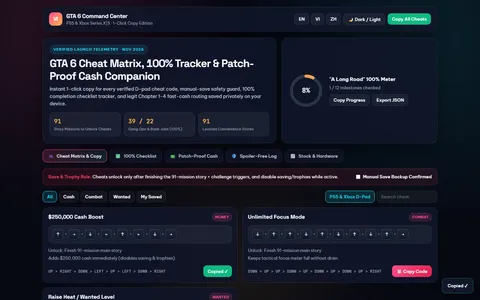
Instead of wading through cluttered ad pages, open our free 1-Click GTA 6 Cheat Sheet & Checklist Dashboard alongside your console to check Chapter 1 progress and verified rules in seconds.
Do's & Don'ts When Starting GTA 6
Use these practical guidelines to protect your console saves, in-game finances, and evening rest across Leonida.
Do
Avoid
Play on official PlayStation 5 or Xbox Series X|S and create a manual backup save before testing cheats.
Downloading fake mobile APKs or PC installers that risk malware and stolen credentials.
Earn clean cash across 91 convenience stores, 39 gang ops, and 22 bank jobs in Chapters 1–4.
Chasing unstable money glitches that risk save corruption or immediate hotfix patches.
Use a 90-minute evening timer and keep our 1-Click Cheat Matrix Dashboard open beside you.
Grinding past 2 a.m. and wrecking sleep and next-day focus.
Keeping two separate manual saves before trying any post-Mission-91 D-pad code protects your 100% trophy progress completely. For calmer daily habits alongside gaming, explore healthy relationship boundaries and 6 calm-energy methods on the blog.
Our 3-Step Safe Play Framework helps you play focused, progress cleanly, and log off refreshed:
Step 1 — Verified Console & Early Backup: Play directly on official PS5 or Xbox Series X|S and keep a clean manual save at the start of every chapter.
Step 2 — Open the Free HTML Cheat Dashboard (open here): Use 1-click copy buttons to check Mission 91 unlock rules, 91 store routes, 39 gang ops, 22 bank jobs, and Chapter 1 milestones ad-free.
Step 3 — 90-Minute Timer & Screen-Free Unwind: When the timer ends, wrap up your current checkpoint, save cleanly, and take 15 screen-free minutes to breathe before sleep.
Knowing your exact evening objective inside the 1-click checklist dashboard turns short sessions into smooth progress. If your household is also balancing launch-week schedules, read keeping harmony at home during GTA 6 week.
Three Key Technical Notes for GTA 6 Beginners
Why don't D-pad cheats trigger early? Rockstar locks all cheat inputs until Mission 91 credits roll so players experience the core campaign first.
Do cheats break the 'A Long Road' 100% trophy? Only if you save over your primary file while cheats are active. Keep Slot 1 untouched for all 91 missions, 91 stores, 39 gang ops, 22 bank jobs, and wildlife scans, and use Slot 2 purely for post-story sandbox play.
Pre-Chapter 1 Setup Tips & Jennie's Perspective
Before starting Jason and Lucia's journey across Leonida, spend three minutes checking free SSD storage on your PlayStation 5 or Xbox Series X|S, installing the latest official patch, silencing distracting phone notifications, and turning on warm indirect lighting behind your television to reduce eye fatigue during high-speed Vice City drives.
More importantly, make a habit of creating a clean backup save file as soon as the Chapter 1 introduction wraps up so you stay in full control of your campaign milestones. Combining verified console hardware, a tidy 90-minute evening play window, and our 1-click Vietnamese Cheat Sheet Dashboard keeps every mission enjoyable while protecting daytime focus and household peace.
Jennie's perspective: leisure stays deeply restorative when entered with clear intention, a defined starting time, and a clean stopping bell. When you finish daytime priorities, share 30 warm minutes with family, and enjoy a focused 90-minute evening session, both joy and inner calm thrive side by side. Continue exploring 7 daily habits for steady peace and let us know below whether you are playing on PS5 or Xbox Series X|S.
Jennie has no separate AI assistant on Claude or ChatGPT; her Yin Yang Masters app is listed there — birth charts, numerology and lucky dates right in the chat.
Little Assistant is Jennie's helper. Every hour she writes a diary note about new posts and videos, plus a calm 3-minute practice. Come say hi at her desk.